Happy Kids Timer Chores
- 4.2
- Rating
- 1.00M
- Installs
- Free
- Price

 Analysis by App-foxy
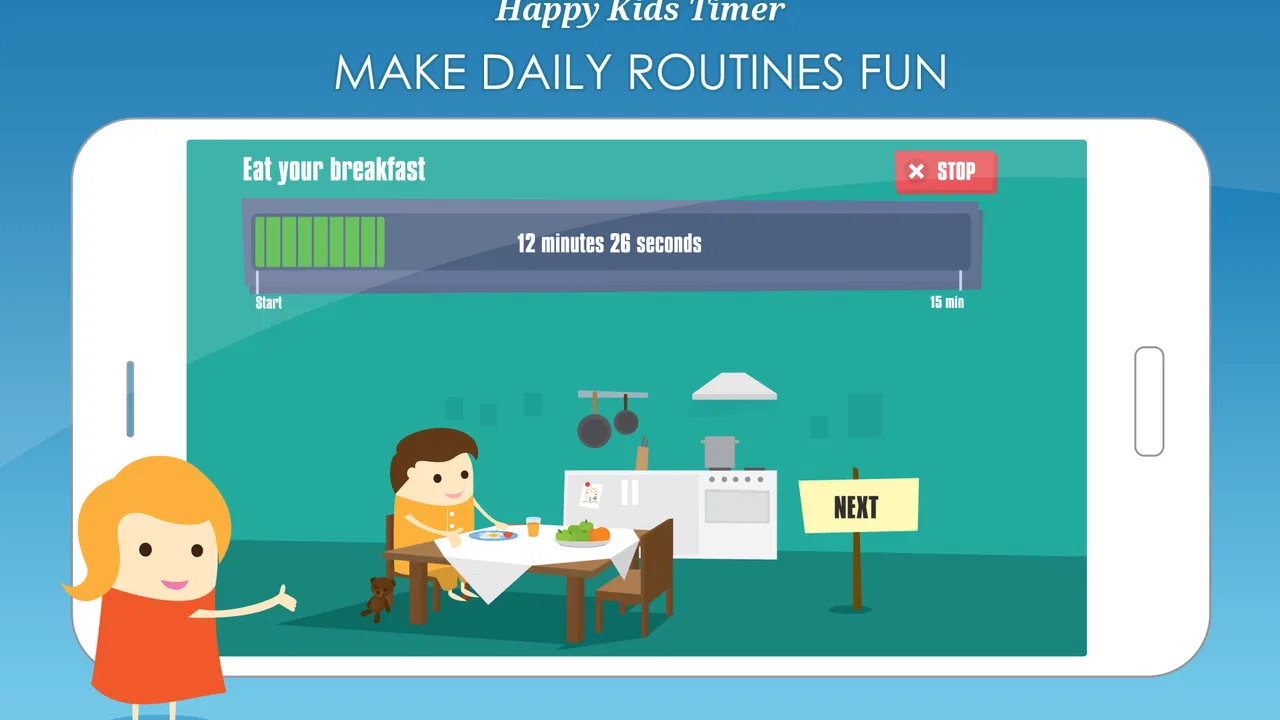
Getting children through chores often takes more effort than the chore itself. A simple request such as putting toys away can turn into repeated reminders, negotiations, and a parent eventually doing the task. Happy Kids Timer Chores takes a different approach: it turns the routine into a visible countdown that a child can follow. I found the idea especially useful for families who want to reduce verbal prompting without making every small responsibility feel like a punishment.
This is a parenting app from Kids Smart Zone, available free of charge for everyone. It has reached over a million installs and holds a 4.2 average from around 22 thousand ratings, which suggests that the basic concept has connected with many families. There are optional in-app purchases priced from about $1.28 to $2.99 per item, so I would treat the free version as a chance to test the routine before spending anything.
What to Expect Before You Begin
The central experience is visual rather than text-heavy. Instead of explaining a long list of instructions, the app gives a child a clear sense that a routine has started and that time is moving toward an endpoint. That matters for younger children who may not yet respond well to written schedules or abstract instructions such as “do it quickly.” They can see that the activity has a beginning, a middle, and a finish.
You May Also Like

 Blood Strike: 2.5 Anniversary
Blood Strike’s Loadouts Turn Every Drop Into a Tactical Gamble
A close look at Blood Strike’s custom loadouts: how fast access to signature weapons reshapes its battle royale rhythm, rewards preparation, and narrows the gap between fights.

 Pandora - Music & Podcasts
Pandora’s Music Is Easy to Start, but Harder to Recover
Pandora’s strength is its low-effort path from a seed to a station. Its weak spot is how much confidence it asks you to place in connection, setup, and quiet recovery.

 8 Ball Pool
 Is Built on Rivalries, Rematches, and Routine
A close look at the rivalries, rematches, shared routines, and unanswered safety questions that turn a quick pool match into a persistent mobile community.

 Samsung Music
’s Quiet Strength Is Playing What You Already Own
Its reach comes less from spectacle than from dependable access to a personal library. That simplicity is both the app’s strongest retention engine and its ceiling.

 AccuWeather: Weather Radar
AccuWeather Review: A Quick, Clear Forecast for Everyday Decisions
For everyday plans, the best forecast is the one you can understand quickly. AccuWeather makes rain timing, radar, and local conditions easy to act on, with a few trade-offs.

 Hill Climb Racing
Why Hill Climb Racing Still Turns Crashes Into One More Run
A tiny car, a bumpy hill and one more upgrade: Hill Climb Racing keeps resurfacing because its simple chaos makes every near-miss feel personal.
More From Our News Desk



I would not approach it as a full household management system. Its strength is the moment when a child needs help starting and staying with a routine. It is better suited to a short sequence of everyday responsibilities than to tracking every task in a family calendar. That distinction is important because parents looking for assignments, shared lists, reminders, or detailed progress reports may find a conventional chore organizer more appropriate.
The app is categorized under parenting, and that feels accurate. It is not trying to replace your explanation, supervision, or encouragement. Instead, it gives the child a visual anchor so the parent does not have to repeat the same time-related instruction several times. In my experience, that makes it most helpful during transitions: cleaning before dinner, getting ready to leave, or finishing a small bedroom routine before play resumes.
The age rating is Everyone, but that does not mean every child will react to the timer in the same way. Some children enjoy a visible challenge and become more independent when they can see progress. Others may become anxious if the countdown feels like a race. I recommend presenting it as a friendly guide rather than a test. The goal is to complete a routine with less friction, not to make a child feel they have failed because the screen reached its endpoint.
Why a visual countdown can work better than reminders
Parents often become the clock. We say “five more minutes,” then “two more minutes,” then repeat the instruction when the child gets distracted. A visual timer moves part of that responsibility onto the device. The child can check the screen instead of waiting for another adult prompt, and the parent can focus on helping only when the child genuinely needs assistance.
That does not make the app automatically effective. A timer cannot decide whether the task was realistic, whether the child understands what “clean” means, or whether a younger sibling is interrupting. The useful insight is that the countdown works best after the routine has been made concrete. “Put everything away” is vague. “Place the books on the shelf, put the blocks in their box, and bring the dirty clothes to the basket” gives the timer something practical to support.
The first meaningful success comes from pairing the screen with one clearly defined action. I would resist the temptation to introduce a complicated morning or evening plan immediately. Start with a task the child already knows, keep your explanation brief, and let the app provide the structure. A quick success makes the tool feel reassuring instead of demanding.
Setting It Up for the First Routine
After installing the app, I would begin with the least stressful part of the day rather than the busiest one. Mornings can be tempting because routines are often difficult then, but they also contain more variables: clothing, breakfast, school materials, and last-minute changes. A short cleanup after an afternoon activity is usually a better first trial because you can observe how the child responds without the pressure of leaving home.
Before pressing anything, decide what completion actually looks like. For example, choose “clear the play area” and identify the three visible actions involved. This preparation is more important than trying to find a perfect timer setting. If the child does not know where items belong, the countdown may simply make the confusion happen faster.
When introducing the app, I would show the screen first and explain the idea in ordinary language: “This helps us see how much routine time is left.” Avoid presenting it as a consequence for slow behavior. That small change in wording affects whether the child sees the app as a helper or as another authority figure telling them what to do.
A useful first-session workflow is simple:
Choose one familiar chore with a visible result.
Show the child the routine before starting the countdown.
Point out the beginning and the end, rather than giving a long technical explanation.
Stay nearby for the first attempt, but let the child look at the screen independently.
When the routine ends, discuss what was completed before deciding whether anything still needs attention.
This approach also answers a question many first-time users have: does the app replace supervision? No. For a child who is still learning the routine, adult support remains necessary. The difference is that you can gradually shift from directing every step to checking in at sensible points. That is where I see the app offering its real value.
Choosing the right level of independence
For a young child, I would use the timer while standing close enough to answer questions. For an older child who already knows the household expectations, I would start the routine and step away briefly, returning near the end. The same visual countdown can therefore support different levels of independence, but the parent has to adjust the amount of supervision.
One practical tip is to keep the first routine shorter than your ideal routine. If the child is successful with a small cleanup, you can add another step later. Starting with an ambitious sequence creates a misleading impression that the app does not work, when the real problem is that the routine was too large or poorly defined.
I also recommend separating “doing the task” from “making it perfect.” If the first session ends with a few items not aligned exactly or a drawer that is not arranged like an adult would arrange it, decide whether that matters. A timer is more likely to build independence when the standard is clear but reasonable. Constant correction teaches the child to wait for the parent instead of acting alone.
The First Successful Action
Imagine a child has finished playing and the living room floor is covered with blocks, books, and soft toys. Rather than announcing a broad cleanup, I would point to the three groups and say where each belongs. Then I would start the visual countdown and let the child begin with the easiest group. The first win is not necessarily finishing every item; it is seeing the child start without another reminder.
During that first attempt, watch what the child actually does. Do they keep checking the timer? Do they understand that the remaining time is a guide rather than a score? Do they stop when the screen reaches the end, even though one small step remains? These observations help you adjust the routine more effectively than simply changing the time.
If the child becomes distracted, point back to the next physical action instead of repeating the entire instruction. “Books first” is more useful than “Come on, you need to clean up.” The app supplies the visual structure, while your words should remain specific and calm. This division of roles is one of the best ways to avoid turning the timer into another source of nagging.
At the end, acknowledge the behavior you want repeated. “You started when the routine began” is more informative than a general “good job.” If the task was not completed, ask what caused the delay. Maybe the storage box was full, a toy was missing a place, or the routine included too many steps. The answer may point to a household problem rather than a motivation problem.
Another non-obvious use is to let the child help define the order of familiar chores. You can keep the same general routine while allowing a choice between putting away books first or collecting toys first. The countdown remains stable, but the child gains some control over how to begin. I find this especially helpful for children who resist instructions mainly because they dislike feeling controlled.
Making the screen a bridge, not the reward
It is easy to turn any child-focused app into the main attraction. I would avoid making screen access the only reason to participate, because then the routine may become dependent on the device. Instead, use the app as a bridge toward a predictable habit. Once the child knows the sequence, you can occasionally ask them to follow the same routine without opening it and see whether the structure has transferred.
This also helps families decide whether they need to keep using it every day. Some children benefit from the visual prompt for a long period, while others need it mainly during a transition or while learning a new routine. The app is most successful when it gradually reduces the amount of adult prompting, not when it becomes another permanent demand that the parent must manage.
Common Confusion and Friction
The first possible confusion is expecting the app to understand the chore automatically. A visual countdown can organize time, but it cannot see whether the floor is clean or whether a child has completed a multi-step instruction. Parents still need to define the task and decide what counts as finished. If you want automatic verification, detailed assignments, or a record of completed chores, a more feature-heavy household app may suit you better.
A second issue is the difference between speed and readiness. A child who is tired, hungry, overstimulated, or struggling with a transition may not respond well to a countdown. In that situation, adding pressure can make the routine worse. I would pause the timer-based approach and first address the reason the child is stuck. The app is a structure for a workable routine, not a solution for every emotional or behavioral difficulty.
Some families may also find the visual format too stimulating. If the child keeps watching the countdown instead of completing the task, move the device to a visible but less distracting place. The screen should answer “how much routine is left?” without becoming the activity itself. This is a small placement decision, but it can change whether the tool supports concentration or competes with it.
Another realistic limitation is that one timer cannot fit every child or every chore. A routine that feels comfortable for an older child may be too demanding for a younger one. A parent may also need to divide a large task into separate sessions rather than expecting one continuous effort. I would judge the setup by the child’s ability to begin and understand the sequence, not by whether the entire household finishes on an adult’s preferred schedule.
It is also worth remembering the optional purchases. The app is free to try, but some items cost from about $1.28 to $2.99 each. I would use the basic experience first and only consider an extra purchase if it clearly supports the routine your family is already using. Buying additional content before knowing whether your child likes visual countdowns is unnecessary.
When another approach is better
A paper picture schedule may be better for a child who needs a sequence they can inspect without a moving clock. A standard alarm may be enough for an older child who only needs a start signal. A shared chore list is more suitable when several family members need assignments and accountability. Happy Kids Timer Chores occupies a narrower but useful space: it helps make a child’s routine visible and time-bound.
I would also skip it if your main goal is detailed household administration. The app is not the right choice simply because it is in the parenting category. Its appeal depends on a specific problem: a child knows what to do, but struggles to begin, stay with the task, or understand how long the routine should last. If that is not your situation, a simpler tool may create less friction.
Families should think about temperament as well. Children who enjoy visual progress may respond quickly, while children who interpret countdowns as pressure may need a gentler presentation or a non-timed checklist. There is no benefit in forcing this particular method when the child is clearly becoming more distressed. A useful parenting tool should make the relationship around the routine calmer, not merely make the routine faster.
Taking the Next Step After the First Win
Once the child has completed one routine successfully, keep the next change small. You might use the same countdown for a different familiar chore, or keep the chore the same while allowing the child to start it with less adult direction. Changing both the task and the expectations at once makes it difficult to tell what helped.
For a morning routine, I would prepare the physical environment the night before: place needed items where the child can reach them, make the order obvious, and remove avoidable decisions. Then use the app to support the sequence rather than asking it to compensate for missing preparation. This is a subtle but important trade-off. The timer can make time visible, but it cannot make an inaccessible jacket or an overflowing laundry basket easier to handle.
After several successful sessions, try a handoff. Let the child open the app or indicate when the routine should begin, depending on their age and confidence. Your role can shift to checking the result at the end. If the child still needs constant prompts, return to one clearly defined action instead of adding more instructions. Independence grows through manageable repetition.
Keep the feedback concrete. Ask which part felt easy, which part caused a delay, and whether the order made sense. You may discover that the child does not need more time; they need a different sequence. For example, putting away large items before small ones can create space and make the rest of the cleanup easier. This kind of adjustment is where the app becomes more than a countdown: it gives you a framework for testing a routine and improving it.
Happy Kids Timer Chores runs on Android from version 8.0 onward, and its current version is 2.17.0. Those details make it practical for families using a compatible older device as a dedicated routine screen, although I would still choose a device that the child can see clearly without turning the session into general entertainment. Since it is rated for Everyone, it is approachable for a broad family audience, but the best results still depend on matching the routine to the child.
Kids Smart Zone has kept the concept focused, and I think that focus is its main advantage. You are not asked to learn a complicated reward economy or build an elaborate chore database before trying it. You can begin with one action, observe the child’s response, and decide whether the visual countdown genuinely reduces reminders in your home.
My recommendation is therefore specific rather than universal. I would suggest it to a parent whose child understands simple chores but loses track of time or needs repeated prompts to start. I would be more cautious for children who dislike timed activities, for families wanting shared task management, or for anyone expecting automatic confirmation that a chore was completed.
After using Happy Kids Timer Chores, my impression is that its value comes from the small behavioral shift it can encourage: the child sees the routine, starts it, and gradually relies less on a parent’s running commentary. Begin with one familiar task, keep the instructions concrete, treat the countdown as a guide, and adjust the routine when reality gets in the way. Used that way, this free parenting app can become a calm starting point for building everyday independence.
FAQs for Happy Kids Timer Chores
01What is Happy Kids Timer Chores, and how does it work?
Happy Kids Timer Chores is a family-oriented app designed to help children follow daily routines and complete household tasks in a more engaging way. Parents can organize chores, establish schedules, and encourage kids to stay on track through visual guidance and progress-based motivation. The exact tools may vary by device version, so it is worth reviewing the current feature list before downloading.
02Is Happy Kids Timer Chores suitable for young children?
The app is primarily intended for children who can understand simple instructions and follow a basic routine, although the ideal age depends on the child’s independence and reading ability. Younger users may need help from a parent when setting up tasks or interpreting instructions. Adults should also supervise chores involving cleaning products, kitchens, stairs, pets, or any potentially unsafe household activity.
03Can parents customize chores and daily routines?
Customization is one of the main reasons families may choose Happy Kids Timer Chores. Parents can generally adapt routines to match a child’s age, schedule, and responsibilities by adding or arranging tasks and setting suitable expectations. Before relying on the app for a complete household system, check whether the current version supports the specific reminders, recurring chores, profiles, or scheduling options your family needs.
04Does Happy Kids Timer Chores require an internet connection or include purchases?
The basic routine experience may work without a constant connection, but some features can depend on internet access, account services, advertisements, synchronization, or updates. Availability of premium tools and in-app purchases may also differ between Android and iOS versions. Parents should review the store listing, permissions, subscription terms, and purchase settings before allowing a child to use the app independently.
05Is Happy Kids Timer Chores safe and privacy-friendly for children?
Because the app is intended for families and children, parents should examine its privacy information before installation. Check what data is collected, whether an account is required, how notifications work, and whether third-party advertising or analytics are used. It is best to configure the app together with your child, restrict purchases, avoid entering unnecessary personal information, and keep the device’s parental controls enabled.
Pros
- Simple visual timers help children understand how long chores should take.
- Colorful rewards can make routine tasks feel more engaging for young kids.
- Parents can customize chore routines to match their child’s daily schedule.
- Clear progress tracking helps children see completed tasks independently.
- Useful for building consistent morning
- bedtime
- and cleanup habits.
Cons
- The child-focused design may feel too basic for older children.
- Some features may require in-app purchases or a premium subscription.
- Limited customization can make routines less suitable for complex households.
- Timers and reminders may become repetitive after extended use.
- Children still need supervision for chores involving safety or household tools.

Happy Kids Timer Chores
Gallery